Test Case Management
Automatically export Jenkins test results to TestRail, Xray, or ALM using BuildButler's JSON configuration.
BuildButler can automatically export test results from your Jenkins builds into external test case management tools. Configure one or more export rules as a JSON array — each rule matches Jenkins jobs by pattern and maps results to the target system.
TestRail
BuildButler exports test results to TestRail by creating/updating test cases, test runs, and test plans. Configure export rules as a JSON array where each object targets a set of Jenkins jobs.
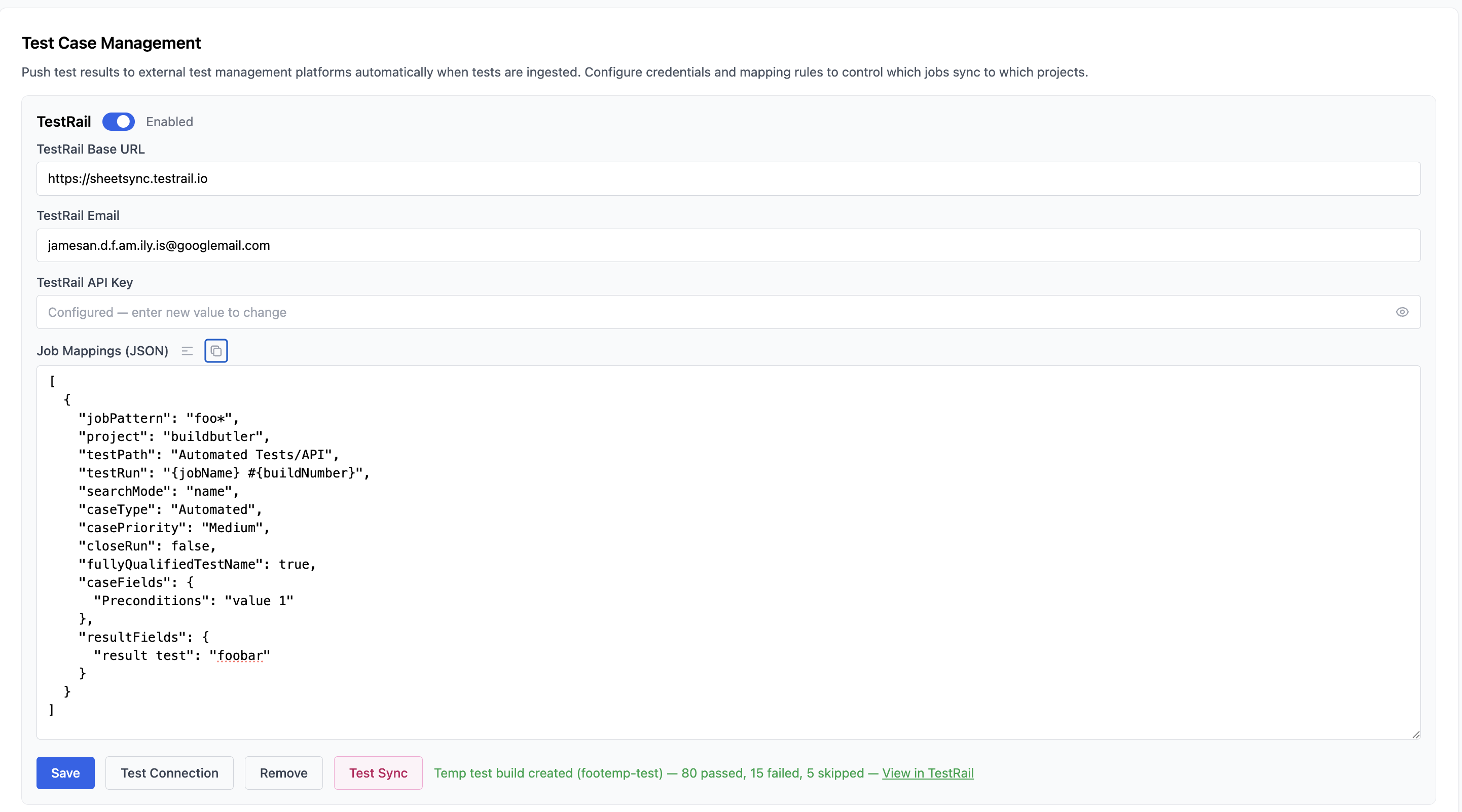
Example configuration
Template variables
Use template variables inside string values to dynamically reference build metadata:
| Variable | Description |
|---|---|
{jobName} | Jenkins job name |
{buildNumber} | Build number |
{branch} | Git branch name |
{date} | Build date (YYYY-MM-DD) |
Configuration reference
Required fields
| Field | Type | Description |
|---|---|---|
jobPattern | string | Glob pattern to match Jenkins job names (e.g. backend/*, **/e2e-*) |
project | string | TestRail project name |
testPath | string | TestRail test case path where cases are created (e.g. Automated Tests/API) |
Test run and plan fields
| Field | Type | Default | Description |
|---|---|---|---|
testRun | string | — | TestRail test run name. Supports template variables. |
testPlan | string | — | TestRail test plan name. When set, the test run is created inside this plan. Supports template variables. |
milestonePath | string | — | TestRail milestone path (e.g. Releases/{branch}). Creates milestones if they don't exist. |
closeRun | boolean | false | Automatically close the test run after export |
closePlan | boolean | false | Automatically close the test plan after export |
Search and matching fields
| Field | Type | Default | Description |
|---|---|---|---|
searchMode | string | name | How to match existing test cases: name (match by test name) or path (match by full class path + test name) |
fullyQualifiedTestName | boolean | false | Use the fully qualified class name as the test case title |
Test case metadata fields
| Field | Type | Default | Description |
|---|---|---|---|
caseType | string | — | TestRail case type (e.g. Automated, Functional, Regression) |
casePriority | string | — | TestRail case priority (e.g. Critical, High, Medium, Low) |
caseFields | object | — | Custom TestRail case field values (e.g. {"custom_automation_tool": "Selenium"}) |
resultFields | object | — | Custom TestRail result field values (e.g. {"custom_environment": "staging"}) |
Upload behaviour fields
| Field | Type | Default | Description |
|---|---|---|---|
uploadMode | number | 0 | Controls how test cases are created: 0 = create new cases and update existing, 1 = create new cases only, 2 = update existing only, 3 = do not create or update cases |
threadCount | number | 4 | Number of concurrent threads for exporting data |
timeout | number | 120 | Upload timeout in seconds |
ALM (Micro Focus / OpenText)
BuildButler exports test results to Micro Focus ALM (formerly HP ALM / Quality Center). Test results are mapped to ALM Test Plan test cases, Test Lab test sets, test instances, and runs. Defect creation and resolution is also supported.
There are two integration modes depending on your deployment:
- Jenkins Local — a post-build step inside the Jenkins plugin, configured per job in the Jenkins UI. Best for teams that want fine-grained per-job control.
- Standalone — a JSON mapping rule configured in the BuildButler system settings. Best for teams using the BuildButler Cloud or Standalone server who want centralised, pattern-based routing.
ALM Field Mappings XML
Both modes support custom ALM field values resolved through a Bumblebee-compatible XML mapping configured in System Settings → Test Case Management. Labels are referenced by name in Custom Properties (post-build step) or customProperties (JSON config).
See Jenkins Local → ALM Integration → ALM Field Mappings XML for the full format reference and an example.
Jenkins Local — post-build step
Add Build Butler HP ALM Uploader as a post-build step to any Jenkins job. This runs after the build and uploads test results directly to ALM using the credentials configured in System Settings.
Test Plan and Test Lab fields
| Field | Description |
|---|---|
| Domain | ALM domain (e.g. DEFAULT) |
| Project | ALM project name |
| Test Plan | Test Plan folder path where tests are looked up. Must start with Subject\ (e.g. Subject\Automated\Regression). |
| Test Plan Mode | Controls what happens when a test is not found in Test Plan. See below. |
| Test Lab | Test Lab folder path where the test set is created. Must start with Root\. Supports template variables. |
| Test Set | Name of the test set to create. Supports template variables. Leave blank to default to {jobName} #{buildNumber}. |
Test Plan Mode
| Mode | Behaviour |
|---|---|
find-only (default) | Searches Test Plan for each test by name. Tests not found in ALM are silently skipped — no run is created for them. Never writes to Test Plan. Use this when your Test Plan is managed separately and you only want to upload execution results. |
create-minimal | Searches Test Plan for each test. If a test is not found, a bare stub is created automatically (name + subject folder only — no attributes, no steps) and the Test Lab run is created as normal. Existing tests are never modified in either mode. Use this when migrating from Bumblebee or when tests may not exist in ALM yet. |
Result collection fields
| Field | Description |
|---|---|
| Format | Test result format: junit, testng, trx, allure, cucumber, robot |
| Result File Pattern | Ant-style glob for result files relative to the workspace root. Examples: junit/testng/trx/robot → **/target/surefire-reports/*.xml; allure → **/allure-results/*-result.json; cucumber → **/cucumber.json |
| Custom Properties | Comma-separated label=value pairs applied to test entities (e.g. Test Environment=Staging, Test User 1=admin). Labels are resolved via ALM Field Mappings XML. |
| Fail build if upload unsuccessful | Mark the build as failed if the upload fails or no tests are matched in ALM |
HP ALM Auto Defect Management
Mirrors Bumblebee's Auto Defect Management. Defects are created, reopened, or closed automatically based on test results.
| Field | Description |
|---|---|
| Defect Create Policy | -- disabled · Create create or update an open defect for each failing test · Reopen create or reopen a defect for each failing test |
| Create Status | ALM status applied to a newly created defect (e.g. New) |
| Create Defect Mappings | Extra fields applied to a newly created defect. One per line: label=value |
| Reopen Status | ALM status applied when reopening a defect (effective only when Create Policy is Reopen) |
| Reopen Defect Mappings | Extra fields applied when reopening a defect. One per line: label=value |
| Severity | Value for the ALM BG_SEVERITY field (e.g. 2-Medium) |
| Defect Resolve Policy | -- disabled · Close close any open defect whose corresponding test now passes |
| Resolve Status | ALM status applied when closing a defect (e.g. Closed) |
| Resolve Defect Mappings | Extra fields applied when resolving a defect. One per line: label=value |
Defect summaries are prefixed with [Build Butler] to distinguish them from manually created defects. BuildButler searches by this prefix + test name when deciding whether to update or create.
Standalone — job mappings JSON
For BuildButler Cloud or Standalone, configure ALM export rules as a JSON array in System Settings → Test Case Management → ALM → Job Mappings. Each rule matches a set of Jenkins jobs by glob pattern and routes their results to an ALM project.
Example configuration
Template variables
| Variable | Description |
|---|---|
{jobName} | Jenkins job name |
{buildNumber} | Build number |
{branch} | Git branch name |
Configuration reference
| Field | Type | Required | Description |
|---|---|---|---|
jobPattern | string | Yes | Glob pattern to match Jenkins job names (e.g. backend/*, **/regression-*) |
domain | string | Yes | ALM domain name (e.g. DEFAULT) |
project | string | Yes | ALM project name |
testPlanDirectory | string | Yes | Test Plan folder path where tests are looked up (e.g. Subject\\Automated Tests). Use \\ as the path separator. |
testLabDirectory | string | Yes | Test Lab folder path where the test set is created. Supports template variables. |
testSet | string | No | Test set name. Supports template variables. Defaults to {jobName} #{buildNumber}. |
customProperties | string | No | Comma-separated label=value pairs. Labels resolved via ALM Field Mappings XML in system settings. |
Xray Coming Soon
BuildButler can export test results to Xray for Jira. Xray integration maps Jenkins test results to Xray test cases, test executions, and test plans within your Jira project.
Example configuration
Configuration reference
| Field | Type | Required | Description |
|---|---|---|---|
jobPattern | string | Yes | Glob pattern to match Jenkins job names |
jiraProject | string | Yes | Jira project key (e.g. BACK, FRONT) |
testPlan | string | No | Xray test plan issue key to associate test executions with |
testExecution | string | No | Existing test execution issue key. If omitted, a new execution is created. |
testEnvironment | string | No | Xray test environment name (e.g. staging, production) |
searchMode | string | No | How to match existing test cases: name or path. Default: name |
revision | string | No | Source code revision to record against the test execution |
labels | string[] | No | Jira labels to apply to created test issues |
Zephyr Scale Coming Soon
BuildButler can export test results to Zephyr Scale for Jira. Test results are mapped to Zephyr Scale test cases, test cycles, and test executions within your Jira project.
Example configuration
Template variables
| Variable | Description |
|---|---|
{jobName} | Jenkins job name |
{buildNumber} | Build number |
{branch} | Git branch name |
{date} | Build date (YYYY-MM-DD) |
Configuration reference
| Field | Type | Required | Description |
|---|---|---|---|
jobPattern | string | Yes | Glob pattern to match Jenkins job names |
projectKey | string | Yes | Jira project key (e.g. BACK, FRONT) |
folderName | string | No | Zephyr Scale folder path where test cases are created |
cycleName | string | No | Test cycle name. Supports template variables. |
labels | string[] | No | Labels to apply to created test cases |
environment | string | No | Environment name to record against the test cycle |